Image Generation JavaScript Samples
This directory hosts JavaScript samples that showcase inference of image generation diffusion models like Stable Diffusion, FLUX, and LCM via the openvino-genai-node package. The samples don't have many configuration options to encourage the reader to explore and modify the source code. For example, change the device for inference to GPU.
Sample files:
text2image.jsdemonstrates basic usage of theText2ImagePipeline(text-to-image) with a step callback and saves the result as a BMP file usingbmp-js.image2image.jsdemonstrates basic usage of theImage2ImagePipeline(image-to-image): reads an input image (JPEG, PNG or BMP), runs the pipeline with astrengthparameter and step callback, and saves the result as a BMP file usingbmp-js.inpainting.jsdemonstrates basic usage of theInpaintingPipeline(inpainting): reads an input image and a mask (JPEG, PNG or BMP), runs the pipeline with a step callback, and saves the result as a BMP file usingbmp-js.denoising_process.jsdemonstratesText2ImagePipeline.decode(): from an asynchronous step callback itawaits the decode of the latent at every denoising step and saves each intermediate image as a BMP file usingbmp-js.
Users can change the sample code and play with the following generation parameters:
- Change width or height of generated image
- Generate multiple images per prompt (
num_images_per_prompt) - Adjust a number of inference steps (
num_inference_steps) - (SD 1.x, 2.x; SD3, SDXL) Add negative prompt when guidance scale > 1
- (SDXL, SD3, FLUX) Specify other positive prompts like
prompt_2 - Add a per-step callback to monitor progress or stop generation early
Download and convert the model
The --upgrade-strategy eager option is needed to ensure optimum-intel is upgraded to the latest version.
It's not required to install ../../export-requirements.txt for deployment if the model has already been exported.
pip install --upgrade-strategy eager -r ../../export-requirements.txt
Then, run the export with Optimum CLI:
optimum-cli export openvino --model dreamlike-art/dreamlike-anime-1.0 --task stable-diffusion --weight-format fp16 dreamlike_anime_1_0_ov/FP16
Run
From the samples/js directory, install dependencies (if not already done):
npm install
If you use the master branch, you may need to build openvino-genai-node from source first.
Run the text-to-image sample:
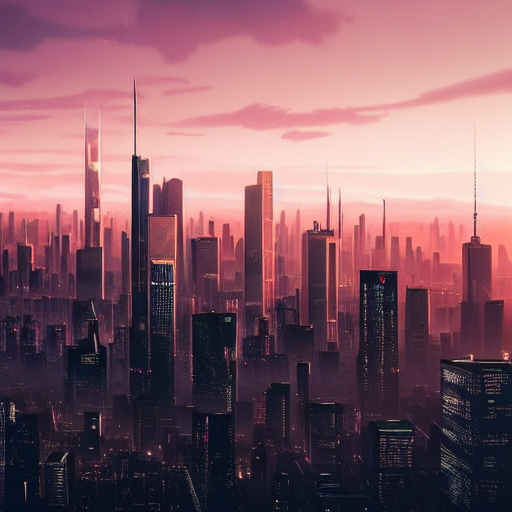
node image_generation/text2image.js dreamlike_anime_1_0_ov/FP16 "cyberpunk cityscape like Tokyo New York with tall buildings at dusk golden hour cinematic lighting"
The result is saved as image.bmp in the current directory.
Run image to image pipeline
The image2image.js sample demonstrates basic image to image generation pipeline. The difference with text to image pipeline is that final image is denoised from initial image converted to latent space and noised with image noise according to strength parameter. strength should be in range of [0., 1.] where 1. means initial image is fully noised and it is an equivalent to text to image generation.
Also, strength parameter linearly affects a number of inference steps, because lower strength values means initial latent already has some structure and it requires less steps to denoise it.
To run the sample, download initial image first:
wget -O cat.png https://huggingface.co/datasets/huggingface/documentation-images/resolve/main/diffusers/cat.png
And then run the sample:
node image_generation/image2image.js ./dreamlike_anime_1_0_ov/FP16 "cat wizard, gandalf, lord of the rings, detailed, fantasy, cute, adorable, Pixar, Disney, 8k" cat.png
The resulting image is:

Run inpainting pipeline
The inpainting.js sample demonstrates usage of inpainting pipeline, which can inpaint initial image by a given mask. Inpainting pipeline can work on typical text to image models as well as on specialized models which are often named space/model-inpainting, e.g. stabilityai/stable-diffusion-2-inpainting.
Such models can be converted in the same way as regular ones via optimum-cli:
optimum-cli export openvino --model stabilityai/stable-diffusion-2-inpainting --weight-format fp16 stable-diffusion-2-inpainting
Let's also download input data:
wget -O image.png https://raw.githubusercontent.com/CompVis/latent-diffusion/main/data/inpainting_examples/overture-creations-5sI6fQgYIuo.png
wget -O mask_image.png https://raw.githubusercontent.com/CompVis/latent-diffusion/main/data/inpainting_examples/overture-creations-5sI6fQgYIuo_mask.png
And run the sample:
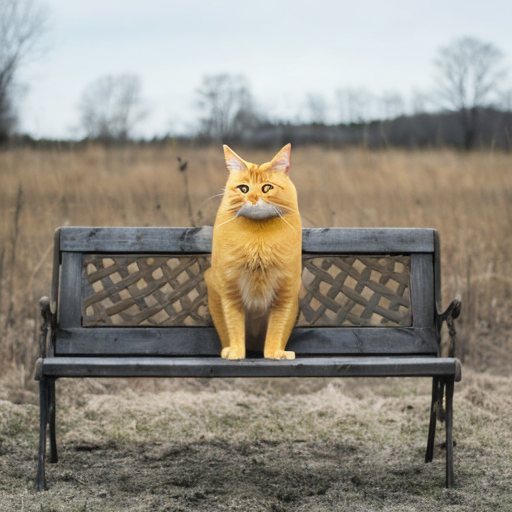
node image_generation/inpainting.js ./stable-diffusion-2-inpainting "Face of a yellow cat, high resolution, sitting on a park bench" image.png mask_image.png
The resulting image is:
Run the denoising process sample
The denoising_process.js sample shows how to decode the intermediate latent produced at every denoising step. The step callback is asynchronous and awaits Text2ImagePipeline.decode() for the latent it receives; decoding runs on a worker thread so the event loop stays responsive. Each intermediate image is saved as a BMP file.
node image_generation/denoising_process.js dreamlike_anime_1_0_ov/FP16 "cyberpunk cityscape like Tokyo New York with tall buildings at dusk golden hour cinematic lighting"
The intermediate images are saved as denoising_step_0.bmp, denoising_step_1.bmp, ... in the current directory.
Optional: change device
The device is hardcoded to CPU in the samples. To use GPU, edit text2image.js / image2image.js / inpainting.js and change:
const device = "CPU"; // GPU can be used as well
Examples
Prompt: cyberpunk cityscape like Tokyo New York with tall buildings at dusk golden hour cinematic lighting
Refer to the Supported Models for the list of supported models.
Run with a step callback
The sample registers a callback that prints progress to stdout on each denoising step. The callback can also stop generation early by returning true:
function callback(step, numSteps) {
  process.stdout.write(`Step ${step + 1}/${numSteps}\r`);
  return false; // return true to stop early
}

const imageTensor = await pipeline.generate(prompt, {
  width: 512,
  height: 512,
  num_inference_steps: 20,
  callback,
});